Making short videos used to mean a camera, some lighting, an afternoon of filming, and then editing it all together. For a small business or a solo creator, that is a lot of work for one Instagram Reel. This is why so many people are now testing AI video tools, type a few lines, or upload a product photo, and you get a short clip back in under a minute.
The hard part is no longer whether AI can make a usable video. It can. The hard part is picking the right tool. There are a lot of them now, they all claim to be the best, and most of the comparison articles online are really just sales pages in disguise.
This guide is meant to help you choose the best AI video generator for social media ads and short marketing videos, based on what you actually make, Reels, Shorts, product clips, or simple promos. We'll go through what to look for, compare the main tools honestly (including where each one falls short), and show real examples with the exact prompts used. PixVerse comes up a fair amount because it fits short social content well, but it isn't the right pick for everyone, and we'll be clear about that.
One thing to set straight early: AI video is not a magic button. Your first result is rarely the one you publish. You'll usually tweak the prompt a few times, and most clips still need light editing, captions, trimming, maybe music, before they go live. Once you expect that, these tools save a real amount of time.
Affiliate Disclosure
This post contains affiliate links. If you click a link and make a purchase or subscribe to a service, we may earn a commission at no extra cost to you. We only recommend tools that are relevant to the topic and useful for creators, marketers, and small businesses.
Why short AI video is worth using for ads and content now?
Short video is where attention is. Reels, Shorts, and TikTok-style clips get pushed hard by every platform, and most small brands know they should be posting more of them. The problem has always been supply: filming and editing enough short videos to stay consistent is slow and expensive, especially if it's just you or a small team.
That's the gap AI video fills. Instead of one polished video a week, you can test five different versions of an ad in an afternoon and see which one holds attention. For product sellers, you can turn a single photo into a moving clip without a studio. For affiliate creators and bloggers, you can add motion to posts that used to be static images. The cost per attempt is low enough that experimenting stops feeling risky.
It helps that the demand is real, not hype. Video now makes up the large majority of internet traffic, and most businesses already use video as a marketing tool. If you're not making short video, you're competing for attention against people who are.
It's worth being honest about the limits too. AI video is strongest for short clips, a few seconds up to around fifteen seconds, and for b-roll, product motion, mood shots, and quick ads. It's weaker when you need long, perfectly consistent storytelling with the same character across many scenes, or precise spoken dialogue matched to a script. The tools are improving fast here, but if your video depends on one exact person saying exact words, an avatar tool or real footage may still serve you better. For most social ads, Reels, and product videos, though, AI handles the job well, and that's exactly the kind of content most creators and small businesses need more of.
The kinds of short videos you can make with AI
Before comparing tools, it helps to know which type of video you're actually trying to make. Most AI video tools are better at some of these than others.
Text-to-video ads
You describe a scene in words and the tool generates it. This is the fastest way to make a short ad or a mood clip when you don't have any footage. It's great for concept testing, write three different ad ideas, generate them, and see which one feels right. The trade-off is control: you're describing what you want, not placing it exactly, so expect to refine the prompt a few times.
Text-to-video ads
Short text-to-video ad clip generated using PixVerse AI.
Prompt Used
Text-to-VideoCinematic beverage commercial on a tropical island beach. A cold Hawaii soda can drops from above and lands in the sand surrounded by tropical fruits. The can slowly rotates in mid-air in slow motion before landing. Sand particles scatter and water droplets shine on the metallic surface. The camera performs a smooth cinematic push-in and slight orbit around the can. Bright tropical sunlight, sparkling reflections, refreshing summer atmosphere, dramatic product reveal, ultra realistic, high-end beverage advertisement.
Image-to-video for product videos
This is the one most small businesses care about. You upload a product photo and the AI adds motion, a slow camera push, a rotation, light and shadow moving across the product. It keeps your real product in the frame instead of inventing one, which matters when the thing you're selling has to look exactly right. This is the most reliable way to get usable product videos out of AI today.
Image-to-video for product videos
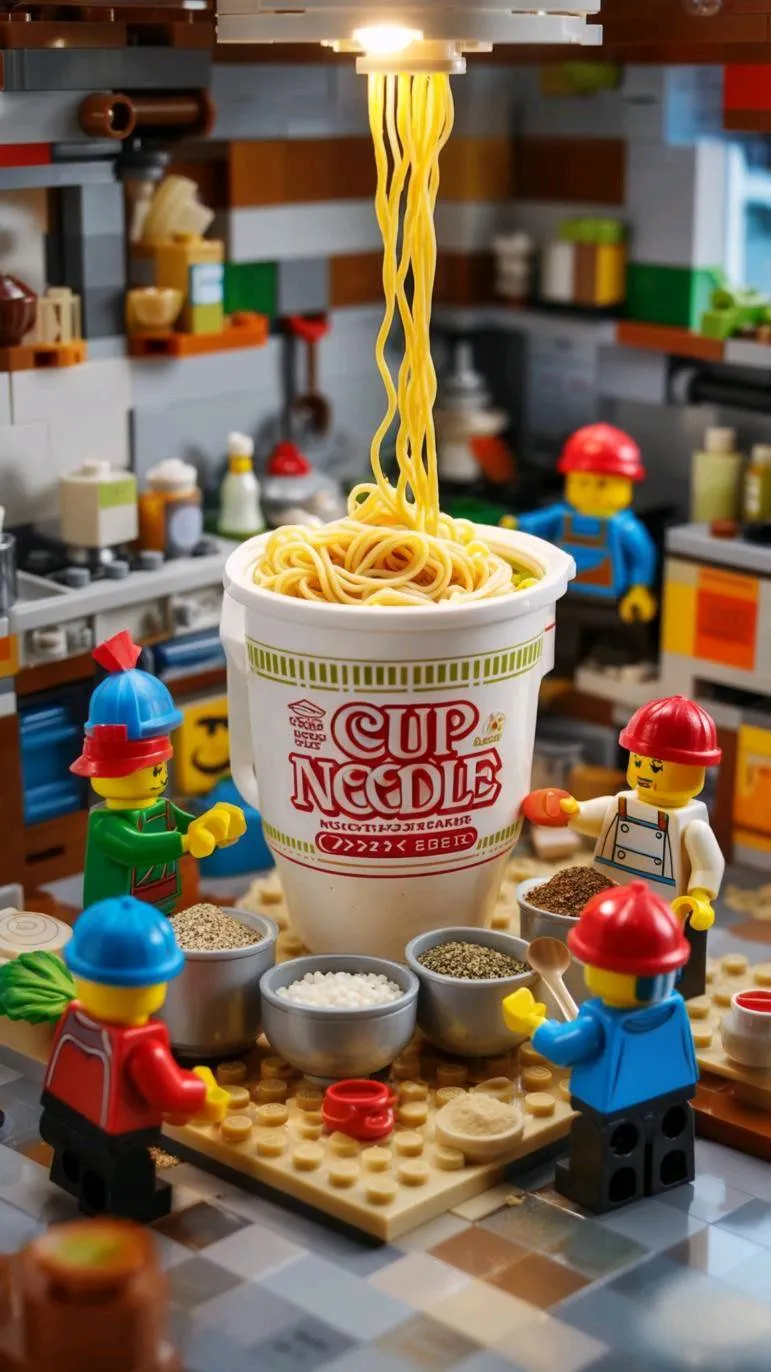
Image-to-video product clip generated using PixVerse AI.
Prompt Used
Image-to-VideoSource image: Product-style cup noodle image used as the visual reference.
Lego workers adding seasonings into the cup noodle while noodles being poured into the cup.
Instagram Reels and YouTube Shorts
These need vertical (9:16) video and a strong first second. Any tool you pick should let you set the aspect ratio to vertical, otherwise you'll be cropping and losing the edges of every clip. For Reels and Shorts, short and punchy beats long and detailed, you're filling a few seconds, not telling a full story.
Instagram Reels and YouTube Shorts
Vertical Reel and Short-style AI video clip generated using PixVerse AI.
Prompt Used
Reels / ShortsThe FOOD-embedded baby-face blinks softly.
Its stylized mouth slowly opens in anticipation as a hand brings a small piece of FOOD toward it.
The FOOD creature leans forward slightly to reach the bite, takes a small nibble with a soft mouth motion, and shows subtle cheek squish, followed by delicate chewing.
Add faint happy micro-expressions and minimal slow breathing, keeping all motions smooth, cute, and delicately understated.
Marketing and explainer videos
For longer, more structured pieces, a 30-second explainer, a how-it-works clip, a talking presenter, you usually move beyond raw generation. Tools that assemble stock footage with an AI voiceover, or that use AI presenters, fit this better than pure clip generators. We'll cover those in the comparison.
Marketing and explainer videos
Marketing and explainer-style AI video clip generated using PixVerse AI.
Prompt Used
Marketing VideoA workplace elite in a modern office, wearing a dark suit, standing by the floor-to-ceiling window to give a report, with neat gestures, city skyline and office desks in the background, concise and professional, cool and bright.
What to look for in an AI video generator for social media ads?
Not every tool does every job. When you're choosing one, these are the things that actually matter for ads and short content:
- Output quality and motion. Look closely at hands, faces, text, and fast movement — that's where AI video still slips. A clip that looks fine at a glance can fall apart on a second viewing.
- Vertical format support. If you make Reels or Shorts, you need 9:16. Some tools also offer 1:1 for feed posts. Check this before anything else.
- Both text-to-video and image-to-video. Text-to-video is for ideas; image-to-video is for real products. A tool that does both gives you more room.
- Consistency. If you want the same product or character to look the same across several clips, this is where most tools struggle. Some now offer a reference-image feature to hold appearance steady.
- Audio. Some tools now add music, sound effects, and even lip-synced dialogue. If you want that built in rather than added later in an editor, check for it.
- Speed and real cost. Most tools run on credits, and here's the catch: you pay per attempt, not per finished video. Your true cost is credits-per-usable-clip, including the retries. A cheap plan that needs ten tries per good clip isn't cheap.
- Commercial rights and watermarks. Free tiers often add a watermark and may limit you to personal use. Before you put any clip in a paid ad, confirm your plan allows commercial use and removes the watermark.
Want to try one of these without paying first? PixVerse has a free tier you can experiment with before committing — Try PixVerse free →
The main AI video generators compared
Here's an honest side-by-side of the tools most creators and small businesses are actually choosing in 2026. Each one is good at something different, so the "best" one depends on what you make.
| Tool | Best For | Text-to-Video | Image-to-Video | Max Clip Length | Built-in Audio | Free Tier | Starts Around | Watermark on Free |
|---|---|---|---|---|---|---|---|---|
| PixVerse | Fast social and product clips | Yes | Yes | ~15s (V6) | Yes | Yes | ~$10/mo | Yes |
| Runway | Production and editing workflow | Yes | Yes (strong) | ~16s | Limited | One-time credits | ~$12/mo | Yes |
| Kling | Motion-heavy, longer clips | Yes | Yes | Up to ~2 min | Yes (v3) | Yes | Varies / bundled | Yes |
| Pika | Quick effects and fast iteration | Yes | Yes | ~10s | Limited | 80 credits, 480p | Low | Yes |
| Luma Dream Machine | Cinematic look and continuity | Yes | Yes | Short clips | Limited | Yes | ~$30/mo (Plus) | Depends on tier |
| InVideo | Full video from a text prompt | Yes | Limited | Full videos (stock based) | Yes (voiceover) | 10 min/week | ~$28/mo | Yes |
| Synthesia | Avatar and explainer videos | Yes (from script) | No (avatar-based) | Full videos | Yes (voice) | 3 min/month | ~$18–29/mo | Preview only |
Prices and limits change often, and credit systems make real costs hard to pin to a single number. Always check each tool's official pricing page before you subscribe.
In short, if you want fast, prompt-and-image short clips for social, PixVerse, Pika, and Kling are the natural picks. If you need an editing platform around the generation, Runway leads. If you want a finished video built from a single prompt, InVideo. If you need a presenter talking to camera, Synthesia. There's no single winner, there's a best fit for your kind of content.
A closer look at PixVerse for short marketing videos
PixVerse is built around the exact workflow most social creators use: type a prompt or drop in an image, get a short clip, post it. That focus is why it shows up so often for ads, Reels, and product videos. Its current version, V6, generates up to 15-second clips at 1080p, with a multi-shot engine and audio generated alongside the video.
It's worth saying plainly: PixVerse is not the highest-end cinematic model on the market, and it isn't trying to be. Its strength is speed and a low starting cost for the formats small teams actually publish. Here's what stands out for short marketing work.
Text-to-video Generation
Describe a scene and PixVerse generates it, with style options like 3D animation, anime, clay, comic, and cyberpunk if you want a specific look. For ad concepting, this is handy, you can spin up several versions of an idea cheaply and pick the one that lands.
Image-to-video for Products
Upload a product photo and PixVerse adds motion while keeping your actual product in the frame. For online sellers, this is the most useful feature: you get a moving product video without a shoot, and the product still looks like itself. You can also set start and end frames to control how a clip begins and finishes.
Camera motion and Cinematic effects
V6 improved camera work; tracking shots, perspective shifts, reveals, and added a multi-shot engine that strings short scenes together more smoothly than older versions. For a punchy ad, controlled camera movement is often what separates a clip that looks deliberate from one that looks like a random AI render.
Built-in Audio and Lip-sync
PixVerse generates sound effects, music, and dialogue with automatic lip-sync, so a clip can come out with audio already attached instead of needing a separate pass in an editor. It won't always be exactly what you want, but it's a real time-saver for quick social posts.
Vertical formats for Reels and Shorts
You can set the aspect ratio to 9:16 for Reels and Shorts, 1:1 for feed posts, or 16:9 for YouTube and websites. Making the video in the right shape from the start saves you from cropping later.