In this article, we will be learning the core 3 metrics that Google uses to measure the overall performance of the website. What is LCP? and Why it is important for SEO?
User experience is essential for any online business and Google gives lots of priority to user experience and website performance. Website performance is not only about the page speed but it is how the user feels throughout their journey on your website.
Core web vital is the set of three metrics Google uses to measure the overall performance of the website in the context of user experience. The three core web vitals are,
- Largest contentful paint (LCP) –It measures how quickly the webpage loads.
- First Input Delay (FID) – It measures when a user tries to interact with a page, how long does it take for the page to respond?
- Cumulative layout shift (CLS) – It measures how much the page layout shifts unexpectedly during the page loads.
In this article, we’ll discuss about,
- What is the largest contentful paint (LCP)?
- Why is LCP important for SEO?
- What is a good LCP score?
- How to measure LCP?
- How to improve the largest contentful paint?
What is the largest contentful paint (LCP)?
Largest contentful paint (LCP) is one of the core web vital metrics that measures how long it takes a website to render the largest part of the content on the screen. Google defines that this metric considers only the content above the page’s fold, meaning everything that appears without scrolling.
Elements of LCP
The largest contentful paint elements like,
- Images
- Image tags
- Background images with CSS
- Video thumbnails
- Text elements such as paragraphs, headings, and lists
Why is LCP important for SEO?
Page loading speed is already a part of Google's ranking algorithm, and it can have a significant impact on a site's ranking on Google's results page. In recent years, Google has placed increasing emphasis on defining evaluation parameters that can enhance the user experience.
For websites, user experience is a crucial factor and can be a key differentiator. It's not enough to have good content, attractive products, and a perfect design. The speed at which a page loads is critical, both for ensuring a positive user experience and for ranking well on Google.
Fast-loading websites are loved by people. Do you know? Even a one-second delay affects the user experience and one in four visitors might abandon a website if the site takes more than four seconds to load. On the other hand, having a fast-loading website means a lower bounce rate and it tends to get higher conversion rates.
Adopting LCP is another way to ensure that web pages load quickly, providing a good user experience to your website visitors and keeping them engaged with your website.
What is a Good LCP score?
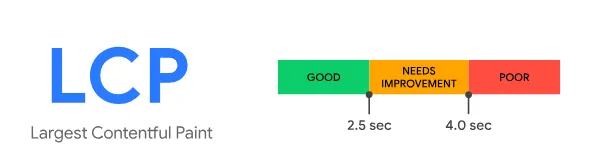
To ensure a positive user experience, Google defines the aim for a “Good” Largest Contentful Paint time as being 2.5 seconds or less when designing your website. If so, the page will get the green score and pass the assessment. Ideally, most of your page loads should take place within this timeframe.
If LCP is between 2.5 and 4.0 s, the score Google clarifies that as “needs improvements” — you’ll get an orange grade.
On the other hand, the LCP is more than 4 seconds. Google defines the score as “poor”, and you need to fix it as soon as possible.
How to measure LCP?
There are lots of tools you can use to test your website’s performance for Largest Contentful Paint – let’s go through some of them,
👉 Google PageSpeed Insights:
Google PageSpeed Insights is widely used and one of the best tools that assesses a website's performance, including LCP, and also provides suggestions to optimize it.
This tool also provides both field and lab performance data of the website for both desktop and mobile devices.
👉 Search Console:
Google offers webmasters Search Console, a free tool to check various technical aspects of website performance, such as CTR, ranking position, and technical errors. One of the sections in Google Search Console is the Core Web Vitals, which presents the Core Web Vitals report.
👉 Lighthouse:
Lighthouse is an open-source tool that measures a website's performance and it helps developers find ways to improve the user experience of their websites.
All you need to do is install the Lighthouse extension on Google Chrome and click “Generate report”. It generates a detailed Core Web Vitals report that encompasses LCP and other Core Web Vitals.
👉 Chrome Dev Tools:
Google Chrome has a built-in tool known as Chrome Dev Tools, which assists developers in analyzing a website's performance. The tool provides comprehensive insights on LCP, such as the specific element that caused it and the duration it took to render.
👉 GT Metrix:
GT Metrix is one of the leading website monitoring tools. Open the tool, enter your website address, and click “Test your site”. Once GT Metrix completes the analysis of the site, it shows the performance grade of every website. You can also see the core web vitals report divided by FCP, LCP, TBT, and CLS. You can click on any of these to see the impact, the audit subject, and the error details.
How to improve the largest contentful paint?
- Resize and compress images
- Compress text files
- Use a content delivery network
- Eliminate render-blocking resources
- Implement Caching
- Upgrade your web hosting service
👉 Resize and Compress images
Optimizing images is crucial for improving the loading speed of your website and optimizing your Core Web Vitals score. Heavy images are typically the largest element of your site, they take longer to download, and finally, they will negatively impact your LCP score. It could either be a hero image, a banner, or a carousel, you have to optimize it for a better LCP.
Compressing images, using Alt text, and choosing the right image format will help to boost your LCP score.
You have to reduce the file size without losing image quality. To optimize your images, you can use tools like Tiny PNG, Kraken, and Optimizilla. Use formats like WebP, and AVIF to make the image lighter in real time. Google recommends the WebP format. WebP format will make the image 30% lighter compared to their JPEG equivalents.
Avoid using Javascript to load images, the Javascript “lazy loading” may be useful for images below the fold but it is not recommended for images above the fold. Lazy loading means loading only the necessary section immediately and delaying the rest of the content until the user requires it instead of loading the complete webpage and rendering it all at once.
👉 Compress Text Files
Compress text files mean "zip" them in a smaller and lighter format, which helps them load faster. This reduces their size and makes the transfer between browser and server quicker, resulting in faster loading times and improved LCP.
To achieve compression, you can use formats like GZIP and Brotli.
👉 Use a Content Delivery Network (CDN)
The content delivery network plays a significant role in improving Google's core web vitals like LCP. When you use a content delivery network, your content is stored on servers distributed globally. This way, instead of having your content stored in one location, when a user requests a page, the content is delivered from the server that is geographically closest to them.
By doing so, it can improve the Largest Contentful Paint (LCP) metric by reducing the distance that data has to travel from the server to the user's device.
👉 Eliminate Render Blocking resources
Eliminating render-blocking resources can significantly reduce LCP issues.
Render-blocking resources are portions of code in your website files that may slow down the page-loading process. This can typically be found in HTML, CSS, and JavaScript files. These files contain scripts that can make it challenging for visitors to view your webpage content. Because the user's browser needs to download resources such as certain JavaScript code and CSS stylesheets, before the content on a webpage can be rendered.
To address this issue, one effective approach is to use tools such as CSS Minifier to minify your CSS and JavaScript files. To use this tool, simply paste your CSS script and click on the Minify button. The tool will compress the script, and you can copy the compressed code and paste it back into your website.
Another approach you could consider is hosting your fonts locally and preloading them. Additionally, it's advisable to avoid heavy plugins such as page builders, as they can introduce excessive amounts of JavaScript and unused CSS to your website, which in turn can slow down server response times.
👉 Implement Caching
Caching is the process of temporarily storing a copy of the HTML resources such as images, scripts, CSS stylesheets, fonts, and other multimedia files of the web page on the server or the browser. This technique reduces the amount of data transferred during the initial rendering process, resulting in faster page load times. There are two caching methods, browser caching and server-side caching.
In browser caching, visitors can store the cache in their local storage, which means they don't have to download the same resources whenever they revisit the website. This is because the website files are already stored locally in their browser. There are two ways to enable caching. You can add code to the website or use plugins.
On the other hand, server-side caching involves storing content, code, queries, and similar data of a web page on the origin server. With this method, the server doesn't have to reconstruct or load page content from the database when a user revisits the site.
👉 Upgrade your Web Hosting service
Upgrading your hosting can be one of the most efficient and effortless methods to boost your website's Core Web Vitals score. Upgrading to a server with better CPU capabilities and larger storage capacity can significantly improve its performance. For large websites with numerous pages, upgrading server speed is crucial. It is recommended to use managed dedicated hosting, which provides a dedicated server capable of handling thousands of visitors, rather than shared hosting.
That's why it's important to consider the hardware specifications of the server before making a decision.
Conclusion
Google Core Web Vitals are user-focused metrics designed to enhance user experience with every algorithm update. Largest Contentful Paint (LCP) plays a crucial role as a search engine ranking factor, directly tied to user satisfaction and site performance.
In this article, we’ve explored effective strategies to improve your LCP score, including:
- Resizing and compressing images
- Compressing text files
- Leveraging a content delivery network (CDN)
- Eliminating render-blocking resources
- Implementing caching
- Upgrading your web hosting service
By applying these techniques, you can significantly improve your LCP score and enhance both your website's performance and search engine rankings.